
Download Debugle – free cloud organizer, team collaboration, task manager
Overview
Debugle positions itself as an all‑in‑one, cloud‑based organizer designed for modern teams that want to eliminate the endless back‑and‑forth of email chains and scattered spreadsheets. By centralising conversations, files, notes and task lists in a single, secure workspace, Debugle helps groups stay aligned without the friction of juggling multiple tools. The platform is completely free, which makes it especially attractive for startups, NGOs, or any collaborative group that needs a robust solution without a subscription fee.
Because everything lives in the cloud, members can access their work from any device, see updates in real time, and enjoy a clear audit trail of who added what and when. While Debugle shines in its simplicity and collaborative focus, it does omit a few niche features that power users might miss—most notably the ability to automatically CC the contents of a conversation to an external email address. Nonetheless, for teams whose priority is to “organise everything in one place” and move quickly from planning to execution, Debugle offers a compelling blend of accessibility, security, and ease‑of‑use.
This review dives into the core capabilities, the installation experience, compatibility considerations, and the pros and cons you should weigh before making Debugle a permanent part of your workflow.
Key Features and Benefits
- Unified Workspace: Combine messages, tasks, files, and rich text notes in a single dashboard.
- Real‑time Collaboration: All changes sync instantly, so every team member always sees the latest version.
- File Storage & Versioning: Upload documents, images, or code snippets; the system tracks revisions automatically.
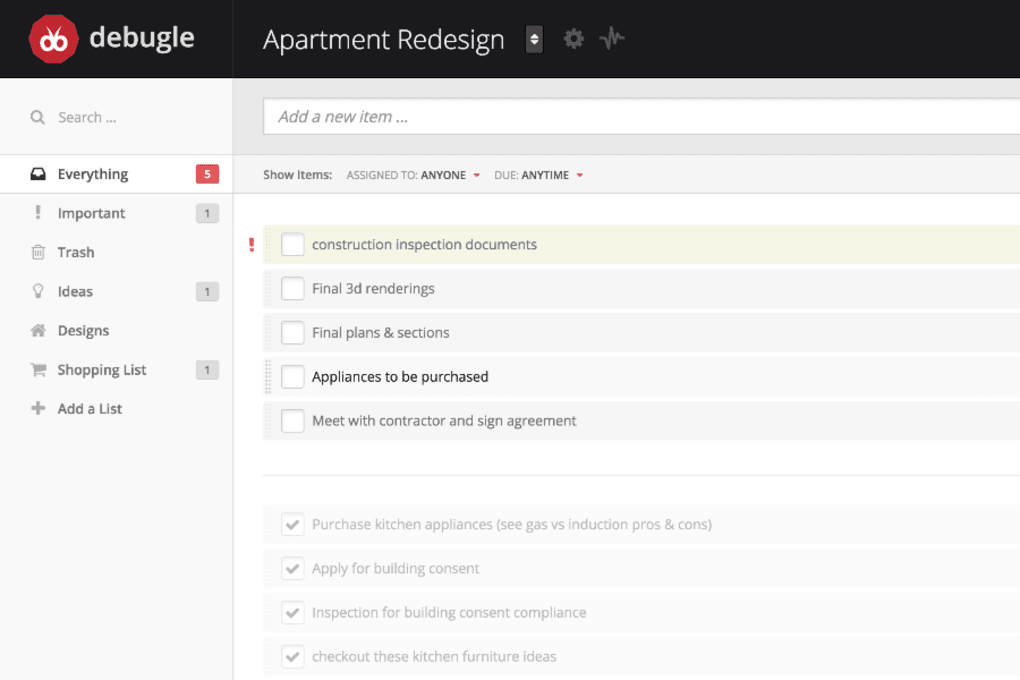
- Task Management: Create, assign, and track tasks with due dates, priority flags, and progress bars.
- Searchable Archive: Powerful search filters let you locate a specific comment, file, or task in seconds.
- Permission Controls: Granular access settings let admins restrict who can view or edit particular sections.
- Cross‑Platform Access: Works on Windows, macOS, Linux browsers, as well as Android and iOS through a responsive web UI.
- Free Forever Plan: No hidden fees; the core feature set remains completely free for unlimited users.
- Secure Cloud Hosting: Data is encrypted at rest and in transit, complying with industry‑standard security protocols.
These features translate into tangible benefits for teams that need to stay organized without drowning in separate apps. For example, the unified workspace eliminates the “search‑and‑find” nightmare that usually follows an email thread, while real‑time collaboration cuts down on status‑update meetings. The built‑in task manager means you no longer need a separate Kanban board, and the searchable archive makes compliance audits painless. Moreover, because Debugle is browser‑based, there’s no client to install, which reduces IT overhead and ensures that every user is always on the latest version. Even though the platform lacks an automatic email‑CC function, the ability to export conversations as PDFs or copy‑paste content into external emails mitigates that limitation for most use‑cases.
Installation, Usage, and Compatibility
Getting started with Debugle is intentionally frictionless. Since the service is cloud‑native, there is no traditional installer for desktop operating systems. Users simply navigate to debugle.com, click the “Sign Up for Free” button, and create an account using an email address or single‑sign‑on (SSO) via Google or Microsoft. After confirming the email, the user is taken to a welcome wizard that guides them through creating their first workspace, inviting teammates, and setting up basic permission levels.
The web UI is built with responsive design principles, meaning it automatically adapts to the screen size of the device being used. Whether you access Debugle from a Windows 10 laptop, a macOS Ventura desktop, an Android tablet, or an iPhone running iOS 17, the experience remains consistent. For power users who prefer a native feel, Debugle offers progressive web app (PWA) support: clicking “Add to Home Screen” on Chrome, Edge, or Safari creates a shortcut that launches the app in its own window, mimicking a desktop application without the need for a separate download.
Operating System Compatibility (itemprop="operatingSystem"): Debugle is fully compatible with all modern browsers on Windows, macOS, Linux, Android, and iOS. The only requirement is an up‑to‑date browser that supports WebSockets and HTML5 (Chrome 90+, Firefox 88+, Safari 14+, Edge 90+). Because the platform runs entirely in the browser, there are no background services or daemons to manage, which simplifies IT policy compliance.
Once inside the workspace, users can create “Boards” for different projects, add “Cards” for individual tasks, attach files by dragging and dropping, and start threaded discussions directly on each card. The interface includes keyboard shortcuts (e.g., Ctrl+Enter to post a comment) and bulk actions (e.g., select multiple tasks to change status). Export options are also built‑in: you can download a CSV of tasks, export a board as a PDF, or sync selected files with external storage services via Zapier integrations (available on the free tier for limited runs per month).
Pros and Cons
- Pros:
- Completely free core plan with unlimited users.
- Real‑time sync eliminates version‑control headaches.
- Responsive web design works across all major operating systems.
- Granular permission settings keep sensitive data secure.
- No installation required – instant access via browser.
- Cons:
- Lacks native email‑CC functionality for external stakeholders.
- Advanced automation (e.g., custom workflows) is limited to paid add‑ons.
- Offline access is only available through PWA, which may not suit all users.
- Reporting analytics are basic compared to dedicated BI tools.
Frequently Asked Questions
Is Debugle really free, or are there hidden costs?
Debugle offers a completely free tier that includes unlimited users, unlimited storage (subject to reasonable usage limits), and all core collaboration features. There are optional paid add‑ons for advanced automation and premium support, but none of these are required to run a functional team workspace.
Can I integrate Debugle with other tools like Slack or Google Drive?
Yes. Debugle provides native integrations with Slack, Google Drive, and Microsoft OneDrive through Zapier and direct API connections. The free tier includes a limited number of Zapier runs per month, which is sufficient for most small‑to‑medium teams.
How secure is my data on Debugle?
All data stored in Debugle is encrypted both at rest (AES‑256) and in transit (TLS 1.2+). The service complies with GDPR and SOC 2 standards, and administrators can enforce two‑factor authentication for added security.
Do I need an internet connection to use Debugle?
Since Debugle is cloud‑based, an active internet connection is required for real‑time collaboration. However, the progressive web app caches recent activity, allowing you to view and edit content offline; changes sync automatically once you reconnect.
How does Debugle handle file versioning?
Every file uploaded to a workspace is automatically version‑controlled. When you replace a file, the previous version remains accessible in the file history, and you can revert or download older versions at any time.
Conclusion – Should You Download Debugle?
If your team is tired of juggling email threads, Google Sheets, and separate file‑sharing services, Debugle offers a clean, centralized hub that brings conversation, tasks, and documents together in a single, free platform. Its real‑time collaboration, robust permission controls, and cross‑device compatibility make it a practical choice for startups, remote teams, and even larger enterprises that want to pilot a low‑cost solution before committing to premium software. While the lack of native email‑CC and limited offline features may be a drawback for some, the overall value proposition—especially the zero‑price tag—far outweighs these minor gaps. Give Debugle a try today, invite your teammates, and experience the productivity boost that comes from having “everything in one place.”
Download Debugle now and start organising your projects for free. The sign‑up takes less than two minutes, and you’ll immediately see how much time you can save by consolidating communications, files, and tasks into a single, secure cloud workspace.



.png)



